Introduction
Sometimes you do not start with a scale name. You only have a few notes.
Maybe you have worked out a melody by ear. Maybe you have written a riff and noticed that everything revolves around five or six notes. Or maybe a student has played a phrase, and you want to quickly show which mode it is close to.
In that situation, the question is not: “Which notes are in the Dorian mode?” The question is: “I have these notes. What could this be?”
That is why I built the Scale Identifier in Six Strings App.
At first, it felt like a logical continuation of the Chord Identifier. If you can choose a fingering and find a chord name, why not choose a set of notes and find possible scales?
To be honest, I mostly built it out of technical curiosity. The main “Chords, Arpeggios, Scales” tool already suggests scales that can be used over a chord. From a practical point of view, the basic task was already covered.
But after building it, I realized that the Scale Identifier solves a different problem. It is not for the moment when you know the chord and want material for improvisation. It is for the moment when you already have notes, but do not yet have a name, a system, or a musical context for them.
What the Scale Identifier Does
The Scale Identifier is a tool that finds possible scales from a selected set of notes.
You select notes, and the tool shows scales that contain them. The result may include major, minor, pentatonic scales, modes of the major scale, symmetrical scales, or more unusual scale structures.
The important part: the tool does not tell you which scale is “the only correct one.” Music does not work that way. The same set of notes can appear in different contexts.
The tool gives you possible options. Then you decide which one fits better by sound, tonal center, chords, and musical purpose.
Why This Is Not the Same as Choosing a Scale for a Chord
At first glance, the Scale Identifier may look like it duplicates the scale suggestions in the “Chords, Arpeggios, Scales” tool.
But these are two different search directions.
When you choose a scale for a chord, you already have a harmonic anchor. For example, you know that Am7 is playing. Now you want to understand which scales can work over that chord.
The Scale Identifier works in the opposite direction. You do not start with a ready-made name. You only have a set of notes: A, C, D, E, G. And you want to understand what it could be.
That set may be A minor pentatonic. It may be part of A natural minor. It may be a fragment of another mode. A set of notes does not always give you the full answer by itself, but it narrows the search a lot.
That is what makes the tool useful.
It does not replace your ear or musical analysis. It removes the manual search and helps you see the likely options faster.
Where the Tool Became Useful in Practice
Analyzing Melodies and Riffs
The most obvious use case is song analysis.
You have worked out a short melody, riff, or vocal phrase by ear. The notes are more or less clear, but you are not sure what system they belong to.
You can write down the notes, open the Scale Identifier, and check which scales fit that set.
For example, if a riff often uses 1, ♭3, 4, 5, and ♭7 relative to its center note, the tool will quickly point you toward minor pentatonic or closely related options.
This is useful when you do not just want to memorize a phrase, but also understand why it sounds the way it does.
Checking Your Own Ideas
Another use case is writing your own music.
Sometimes a riff or melody appears under your fingers before theory gets involved. You just play, find a set of notes that sounds good, and only later try to understand what you have made.
The Scale Identifier helps you name that material.
That is useful for two reasons.
First, it helps you find neighboring notes faster. If the phrase looks like pentatonic, you can try adding the missing degrees and expand it into natural minor, Dorian, or another related sound.
Second, it helps you understand the color. Different scales can use almost the same notes, but one changed note can shift the whole feeling: darker, brighter, more tense, or more stable.
Looking for Modal Color
A scale is not just a “set of correct notes.” It is also a color.
Dorian often feels different from natural minor. Mixolydian feels different from major. Pentatonic sounds different from a full seven-note scale.
If you have found a set of notes and see several possible matches, you can compare them with your ears, not just your eyes.
Play the same phrase with different center notes. Then try adding a characteristic note from one of the suggested scales. Very often, one note explains why the phrase starts to sound like a different style.
That is when the tool stops being just a list of names and becomes a way to search for musical color.
Practicing on the Fretboard
After you find a possible scale, you still need to move it to your instrument.
A name does not help much if you cannot see where the notes are on the fretboard.
That is why the Scale Identifier works well together with the Fretboard Explorer. First, you find possible scales from the notes. Then you open the scale on the fretboard and look at how the notes are laid out.
The interval display is especially useful here. Note names help with navigation, while intervals show the function of each note relative to the center.
This makes it easier to see the tonic, the third, the tense notes, and the stable notes you can use as phrase anchors.
Lessons with Students
For teachers, the tool is a quick way to show the link between a group of notes and a scale name.
A student plays a phrase. The teacher writes down the notes, opens the Scale Identifier, and shows: “Look, you basically played minor pentatonic,” or “This note pushes the phrase closer to a Dorian sound.”
That is better than simply saying the name.
The student sees that a scale is not an abstract table. It is a set of sounds that is already present in their playing.
How to Use the Scale Identifier
Start with a simple workflow.
- Select the notes used in a melody, riff, or exercise.
- Look through the list of matching scales.
- Find the options that match not only the notes, but also the musical feeling.
- Check the center note: which note feels like “home”?
- Move to the fretboard and play the scale in a few positions.
The main thing is not to expect one final answer immediately.
If you only have four or five notes, there may be many matches. That is normal. An incomplete set of notes can be part of several scales.
To narrow the result, add context: the chords under the melody, the bass note, the stable note, the direction of the phrase, and the note the melody wants to resolve to.
Example: You Have Notes, But No Name Yet
Suppose you have written a short riff around the notes A, C, D, E, and G.
By ear, it sounds minor and very guitar-friendly. But you are not sure which scale it is.
In the Scale Identifier, you select those notes and see possible matches. One of the most obvious results is A minor pentatonic: A, C, D, E, G.
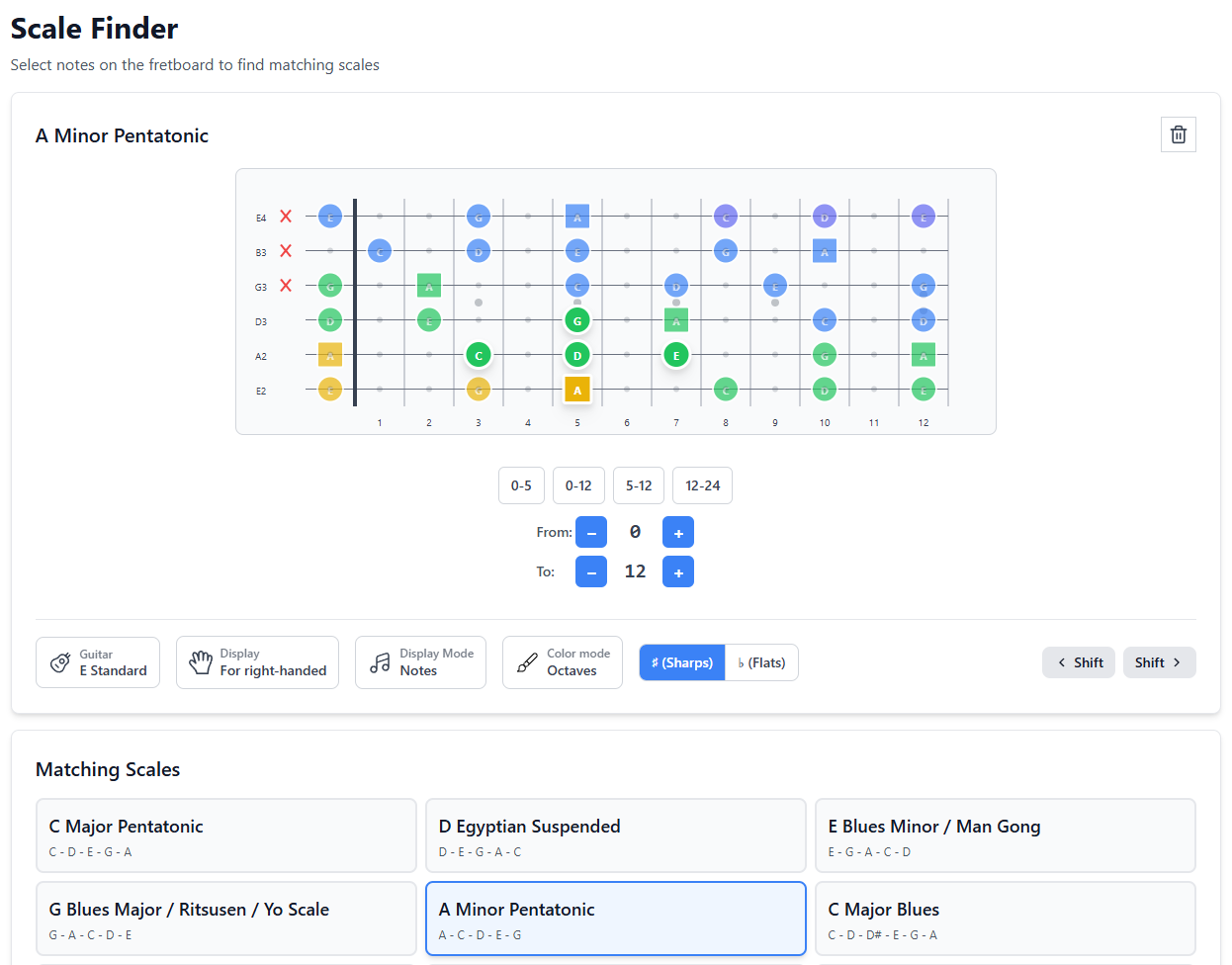
Now you have several directions.
You can keep the material as pentatonic. That works well for a simple riff, a blues phrase, a rock melody, or a solo that does not need extra complexity.
You can add F and B to get A natural minor. The sound becomes fuller, but also more specific.
You can try F# instead of F and move closer to A Dorian. The phrase becomes a little brighter and less “classic minor.”
One original set of notes gives you several ways to develop the idea.
That is the value of the tool: it does not just return a name. It helps you see possible directions.
Common Mistakes
Looking for the Only Correct Answer
If the tool shows several scales, that is not a bug.
One set of notes can belong to different scales, especially when the set is small.
The musical answer depends on context: which note feels like the center, which chords are playing, and which notes the melody emphasizes.
Ignoring the Tonic
The same notes can sound different when the center note changes.
For example, the white keys on a piano can be heard as C major, A minor, D Dorian, G Mixolydian, and so on. The notes are the same, but the center is different.
So after finding possible scales, ask yourself: where is “home”?
Looking Only at the Name
A scale name is useful, but it does not replace the sound.
Play the result right away. Listen to whether it matches what you hear in your head. Sometimes a scale fits technically, but does not give the right feeling because the musical center is somewhere else.
Not Moving the Result to the Fretboard
If you have found a scale but have not played it, the work is not finished.
Move it to the fretboard. Find the tonic. Play the stable notes. Try a short phrase. That is how a name turns into usable musical material.
A 10-Minute Exercise
- Create a short phrase using 4–6 notes on one string or in one position.
- Write down all the notes you used.
- Open the Scale Identifier and select those notes.
- Find 2–3 possible matches.
- For each option, choose a possible tonic.
- Play the phrase while emphasizing different center notes.
- Notice how the feeling changes.
The goal is not to guess the “right” scale. The goal is to hear how one set of notes can change meaning in different contexts.
How to Connect It with Other Six Strings App Tools
The Scale Identifier works best as part of a larger workflow.
If you know the chord and want to find material for improvisation, it is better to start with “Chords, Arpeggios, Scales”. There you can see chord fingerings, arpeggios, and suggested scales for playing over the chord.
If you have a set of notes and want to understand what scale it may be, start with the Scale Identifier.
If you have already found a scale and want to see it across the fretboard, move to the Fretboard Explorer.
If you are analyzing a song more broadly — not only the melody, but also the chords — open Harmony and check how the notes relate to the key.
A practical route looks like this:
- Notes from a phrase → Scale Identifier.
- Found scale → Fretboard Explorer.
- Chord context → Harmony or “Chords, Arpeggios, Scales”.
- Practice → metronome, riff, improvisation, song.
FAQ
Does the Scale Identifier choose the best scale automatically?
No. It shows possible options based on the selected notes. The best option depends on the musical context: tonic, chords, bass note, melodic anchors, and sound.
Why does it find too many scales?
Most likely, you selected too few notes. The fewer notes you choose, the more scales can contain them. Add more notes from the phrase or define the center note.
Can I use it for improvisation?
Yes, but start from the right question. If you are starting from a chord, use “Chords, Arpeggios, Scales.” If you already have a set of notes or a melody, the Scale Identifier helps you understand which scales may be related to that material.
Is the tool only for guitar?
No. You can use it as a music theory tool for any musical material. Then you can view the result on the fretboard for guitar, bass, or ukulele using other Six Strings App tools.
Conclusion
The Scale Identifier started as a logical continuation of the Chord Identifier, almost as a technical challenge for myself.
But in practice, it turned out to be useful exactly where music starts not with a name, but with sound.
You played a riff. You analyzed a melody. You found a few notes. Now you want to understand what they may be. In that moment, the Scale Identifier helps you narrow the search, see possible options, and move from a set of notes to musical context.
To try it in practice, open the Scale Identifier, choose a few notes from your own phrase, and see which scales may stand behind them.